
The visual is ready. You spent an hour in Canva picking the right template, the right font, the right colors. It looks great. Then you open Instagram to publish, and there it is: the cursor blinking in a hopelessly empty text box. The caption. The hashtags. The call-to-action. Designing the image was the easy part. Writing what actually sells your product is where everyone gets stuck.
If you sell on Etsy, run an e-commerce store, do dropshipping or work as a solo founder, this scene is familiar. You're not a copywriter, yet it's often the caption, not the image, that decides whether your Instagram post gets seen, liked, or ignored.
The visual is only half the post
Creating a nice product image has never been more accessible. Design tools like Canva are packed with templates, and putting together a clean visual takes only a few minutes. But an image, however polished, doesn't stand on its own on social media.
What triggers a like, a comment or a visit to your online store is the whole package: the visual and the words that go with it. A product photo posted without context slips by unnoticed in the feed. The caption, the hashtags and the call-to-action are the second half of the work, the half nobody talks about, and the one that takes the most time.
The real bottleneck Time the gap between "the visual is ready" and "the post is published." The design is a fraction of the total. The rest, finding what to write, hunting for the right hashtags, adapting to each network, that's where your evening goes.
Why generic captions don't work
Faced with the blank page, it's tempting to write a one-size-fits-all caption. Something like "Discover our new product ✨ Available now!". The problem: that caption says nothing. It could apply to any product, from any brand. It creates no connection, tells no story, gives no reason to buy.
A post that works always starts from this specific product: its material, its use, the problem it solves, the person it's for. That's the difference between text that fills a space and text that makes people want to buy. And this is exactly where design tools hit their limit: they help you compose an image, but the text they suggest stays disconnected from your real product and from the visual you just created.
The 4 ingredients of a caption that sells
Good news: writing a strong caption isn't a mysterious art. It's a four-ingredient recipe. Here's how to structure each post so it grabs attention and invites action.
1. The hook: the first line that stops the scroll
On Instagram, only the first two lines of your caption show before the "... more". That opening line decides whether the reader stops or keeps scrolling. Avoid starting with "We're thrilled to introduce…". Prefer a question, a concrete benefit, or a bit of tension: "Tired of [problem]?" or "The secret to a [result] is…". The hook has to make people want to read on.
2. The product context: why this one, who it's for
This is the heart of the caption, and what most posts forget. Tell the story of your product: what it's made of, how it's used, what it changes in daily life. A customer doesn't buy an object, they buy what the object brings them. Always tie the context back to your visual: if the image shows your product in use, the caption should continue that story, not contradict it.
3. Hashtags: relevant, not saturated
Hashtags help new buyers find you, but their use has changed. Piling on thirty generic hashtags like #love or #instagood no longer helps: they're too saturated to make you visible. A handful of precise, niche hashtags tied to your product and your audience works far better. A hashtag that describes exactly what you sell attracts the right people, the ones actually looking for that kind of product.
4. The call-to-action: what the reader should do next
A post without a call-to-action leaves the reader admiring… but passive. Tell them clearly what to do: visit your shop, discover the collection, comment, save the post. A good call-to-action is simple, direct and low-pressure. "Link in bio to discover" or "Save this post for later" is enough to turn a viewer into a visitor.
Adapting the caption to each social network
Here's the most common mistake when you're short on time: copy-pasting the exact same caption across every network. But text that lands on Instagram often falls flat elsewhere. Each platform has its own language:
- Instagram: the visual leads, the caption tells a story and creates emotion. Niche hashtags belong here.
- Pinterest: it's a visual search engine. Keyword-rich descriptions live for months, unlike an Instagram post that fades in 48 hours.
- Facebook: the audience reads more. A slightly longer, more personal text with a direct call-to-action works better.
- LinkedIn: the place for process, craft and behind-the-scenes. The product comes through the story of the person making it.
Adapting a caption to each network, for each product, every week, is a considerable amount of writing. That's exactly what discourages most solo founders and leads to an editorial calendar being abandoned.
What if the caption wrote itself from your product?
Let's go back to the original problem. The usual pattern is: you create a visual in a design tool, then go hunting for the words to go with it. Two separate steps, two different tools, and a blank page in between.
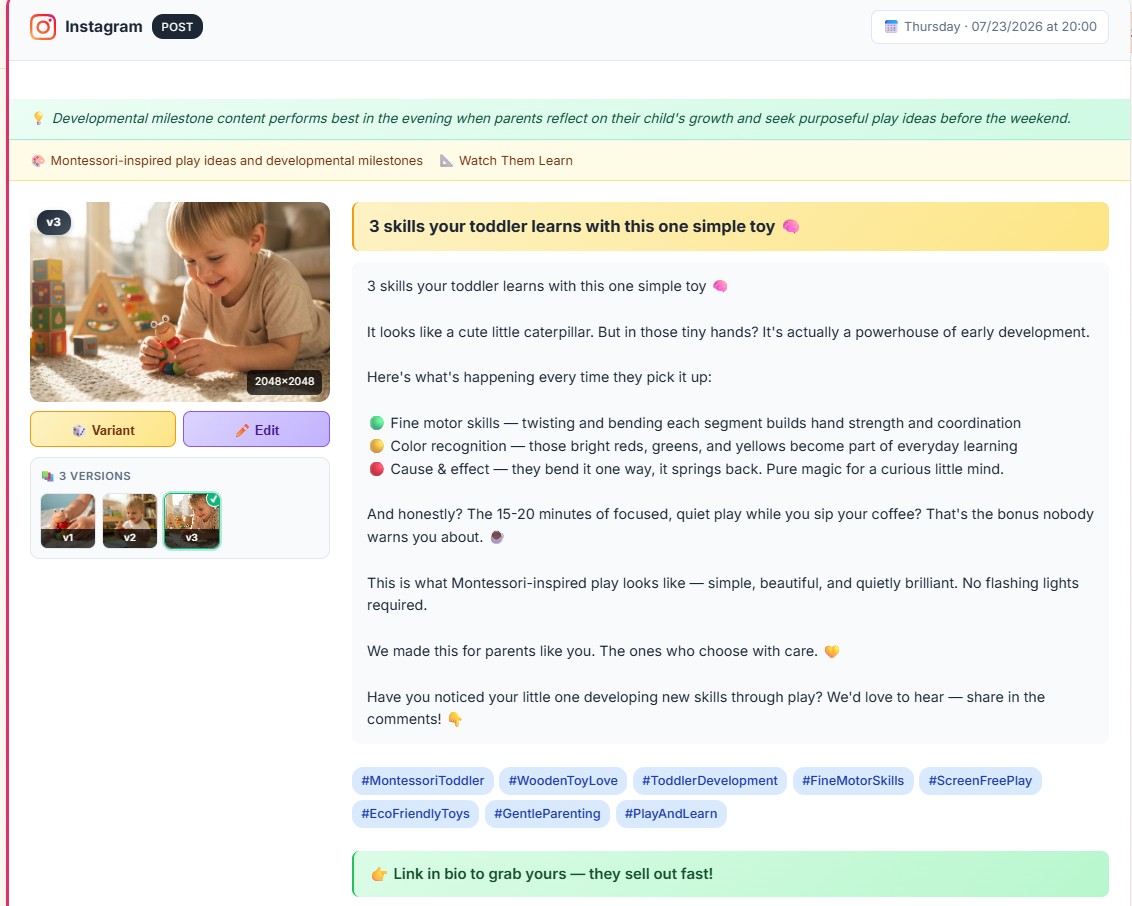
Publinov flips the logic. You start from your product photo, the one taken on your phone between two orders, and the tool generates both the lifestyle visual and the written content that goes with it: a caption tailored to your product, hashtags suited to your niche and a call-to-action. All with no prompt to write: you simply describe your product, not the scene or the text.
The difference is clear. The text isn't a generic line slapped on afterwards: it's built from your real product and consistent with the visual. You go from raw photo to publish-ready post without ever facing the blank page.
Design is the easy part. Words make the sale.
A tool like Canva is excellent for composing an image. But a beautiful image without the right words is still a post that doesn't convert. The real challenge for an online seller isn't creating the visual: it's finding, for every single post, the caption, the hashtags and the call-to-action that make people want to buy.
Whether you sell on Etsy, run an e-commerce store or a dropshipping business, your time is too valuable to spend staring at an empty text box. One photo, one click, and a complete post, visual and caption, ready to publish, faithful to what you actually sell.
Frequently asked questions
How do you write a good Instagram caption for a product?
Start from the specific product, not a one-size-fits-all text. A hook that stops the scroll, the product context (material, use, who it's for), a few niche hashtags and a clear call-to-action. A generic caption, disconnected from the product and the visual, creates no connection and doesn't convert.
How many hashtags should you use on an Instagram post?
Relevance beats quantity. A handful of precise hashtags, suited to your niche and your product, attracts the right people far better than a long list of generic, saturated hashtags like #love or #instagood.
Do you need a different caption for each social network?
Yes. A caption that works on Instagram often falls flat on LinkedIn or Pinterest. The tone, length and call-to-action should be adapted to each network: Pinterest favors keywords, LinkedIn favors process, Instagram favors emotion.
Can you generate a caption automatically from a product photo?
Yes. Publinov starts from your product photo and generates, along with the lifestyle visual, a context-aware caption, suitable hashtags and a call-to-action, with no prompt to write. You go from raw photo to publish-ready post in one click.